AT+CGMI
Get manufacturer string
- Device information
- RockREMOTE Mini
- RockBLOCK Pro
- RockFLEET Assured
- Device
+CGMI | |
|---|---|
AT+CGMI | Returns the device manufacturer string. |
| Example | AT+CGMI+CGMI: Ground ControlOK |
Browse the complete command set for RockREMOTE Mini, RockBLOCK Pro and RockFLEET Assured, then filter it by category, device or service.
The AT command set provides local device control, configuration, firmware maintenance, positioning and Mobile Originated (MO) and Mobile Terminated (MT) Iridium Messaging Transport (IMT) messaging.
Many commands require valid provisioning and may return an error until provisioning has been acquired. Position the Iridium antenna with a good view of the sky and leave the unit powered for at least 10 minutes so it can register and collect its provisioning information, including available IMT topics.
The serial interface supports several independent functions, including AT commands, C-Kermit file updates and NMEA streaming. Use one function at a time. For example, always turn NMEA streaming off before using AT commands or a serial firmware update.
MO = Mobile Originated — a message sent from the device to the Iridium network.
MT = Mobile Terminated — a message received at the device from the Iridium network.
IMT = Iridium Messaging Transport Protocol — medium-sized messaging supporting up to 100 KB per message.
Default Baud speed 115200, 8 data bits, no parity and no flow control. RS232.
(Can be reconfigured following the User Configuration Guide for the appropriate device locally or remotely.)
For example:
Change mode from RS232 to RS4XX_FULL or RS4XX_HALF from v0.28
Not applicable to RockFLEET Assured, please contact Ground Control Support
There is no response to strings or characters that are not defined in this reference. Every command must be prefixed with AT to be recognised.
Characters are not echoed back.
When the device is powered up or following a reboot, the AT interface displays a message of the day containing identificatory information, and sends the same to Cloudloop Device Manager.
This can be toggled in the user configuration. As Cloudloop Startup Messages cost plan balance, however it is important to note that many Cloudloop Device Manager functionalities will not work until either a Startup Message has been received or the device's information has been requested and received.
Applicable from FWv0.18 onwards only.
The combined size of the MO and MT message buffers must be less than 3 MB. The maximum number of messages shared between both directions is approximately 6,000.
All commands use the following structure:
AT+CMD<CR>
AT is the command prefix, +CMD represents the proprietary command and <CR> is the carriage return that ends the line.
A contextual response uses this structure and always ends with OK<CR>:
+CMD: <Response Context><CR>
OK<CR>
A contextual error uses:
+CMD ERROR: <Error Num><CR>
An unsolicited response uses +CMD: <Unsolicited Context><CR>. Use AT+UNS to enable or disable unsolicited messages; they are enabled by default.
The maximum value for a TopicID or MessageID is 65535.
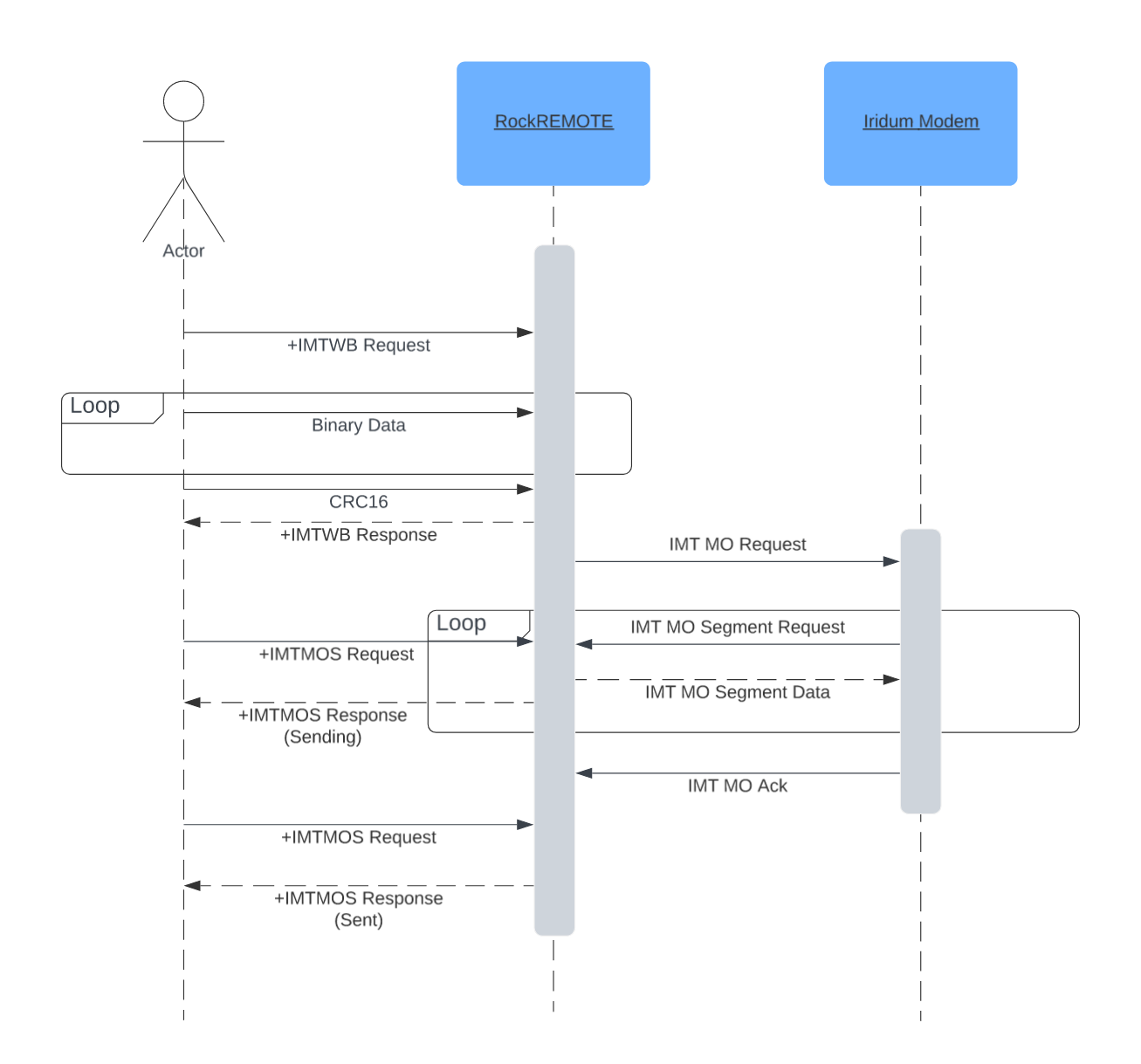
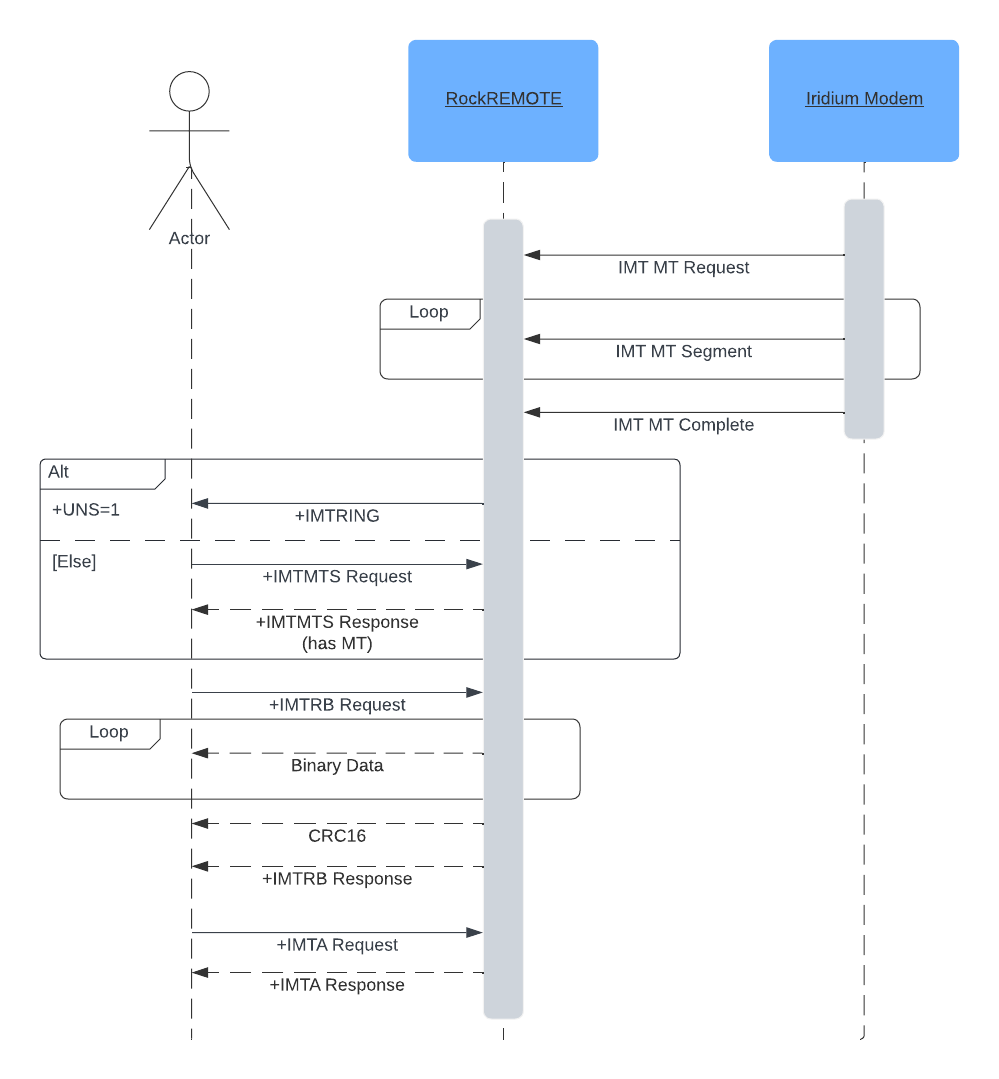
The following sequences show how a host normally sends an MO message and receives an MT message.
38 of 38 command tables shown
Select more than one tag to combine filters. Results update immediately.
AT+CGMIGet manufacturer string
+CGMI | |
|---|---|
AT+CGMI | Returns the device manufacturer string. |
| Example | AT+CGMI+CGMI: Ground ControlOK |
AT+CGMMGet model string
+CGMM | |
|---|---|
AT+CGMM | Returns the model string. |
| Example | AT+CGMM+CGMM: "RockREMOTE Mini"OK |
| Notes | Returns the “Variant” key from the device.cfg file |
AT+CRTWGet Rock 3 Words
+CRTW | |
|---|---|
AT+CRTW | Returns the Rock 3 Words - device serial number. |
| Example | AT+CRTW +CRTW: "mini.mini.me" OK |
| Notes |
AT+CPOWGet power consumption
| Command | Description |
|---|---|
+CPOW | |
AT+CPOW | Returns the average device power consumption in mW over the last second. |
| Example | AT+CPOW+CPOW: 285OK |
| Notes |
AT+CGCVGet the application firmware version
| Command | Description |
|---|---|
+CGCV | |
AT+CGCV | Returns the version number of the application firmware running on the device. |
| Example | AT+CGCV+CGCV: "0.6.1"OK |
| Notes |
AT+CMEMGet available heap memory
| Command | Description |
|---|---|
AT+CMEM | Returns the current amount of available heap memory reported by the device firmware. |
| Response | +CMEM: <Available heap memory>OK |
| Example | AT+CMEM+CMEM: 123456OK |
| Notes | The reported value is intended for diagnostics and may vary during normal operation and between firmware versions. |
AT+CIRVGet the Iridium transceiver firmware version
| Command | Description |
|---|---|
+CIRV | |
AT+CIRV | Returns the firmware version running on the Iridium transceiver. |
| Example | AT+CIRV+CIRV: "1.3.4"OK |
| Notes |
AT+CGSNGet the Iridium 9770 transceiver IMEI
+CGSN | |
|---|---|
AT+CGSN | Returns the Iridium 9770 IMEI |
| Example | AT+CGSN +CGSN: "300058060009380" OK |
| Notes |
AT+CCIDGet the SIM ICCID string
+CCID | |
|---|---|
AT+CCID | Returns the Iridium SIM ICCID |
| Example | AT+CCID +CCID: "8988169771000172669" OK |
| Notes | If no SIM is present the response will be empty +CCID: "" |
AT+CSQGet the signal level
Iridium signal ranges from -100dBm (Excellent) to -120dBm (Worst)
+CSQ | |
|---|---|
AT+CSQ | Returns the Iridium Signal Level. |
| Example | Return signal in dBm and Signal Bars (0-5).+CSQ: <dBm>,<Signal Bars>AT+CSQ+CSQ: -125,0OK |
| Notes | Response of +CSQ: 0,0 is given when the modem has not provided a signal_level - i.e when constellation_visible is false This usually means that at that time there was no satellite in view long enough to acquire a signal reading. More importantly the transceiver reports signal level of any current satellite in view not necessarily the satellite that would ultimately be used to transmit to. View Signal Strength FAQ |
The Iridium Certus 9704 and 9770 transceivers in RockBLOCK and RockREMOTE products are configured in firmware to transmit only when signal strength is at least 1 bar. Do not duplicate this check in your application. Do not delay, block or skip a transmission based on a signal reading; send the data and the transceiver will transmit it when conditions allow.
Signal readings remain useful for diagnostics, installation checks and monitoring.
AT+APNTGSGet the APNT module serial number
+APNTGS | |
|---|---|
| Example | Retrieving the module serial number: AT+APNTGS +APNTGS: JL-03127 OK |
| Errors | +APNTGS ERROR: <Error Num> Error Numbers: 1 Serial Number not found (APNT Module not fitted or disabled) Example: AT+APNTGS +APNTGS ERROR: 1 OK |
| Notes |
AT+CETHConfigure Ethernet
| Command | Description |
|---|---|
+CETH | Returns whether the Ethernet interface is currently enabled in the configuration. |
AT+CETHAT+CETH=0|1 | Disables or enables the Ethernet interface in the configuration. Returns the configured state. |
| Example | AT+CETH+CETH: 0OKAT+CETH=1+CETH: 1OK |
| Notes | Takes effect at next device restart. |
| Errors | +CETH ERROR: 1Incorrect option, 1 = On, 0 = Off |
AT+CSUMConfigure startup messages
| Command | Description |
|---|---|
+CSUM | Returns whether the Startup Messages are currently enabled in the configuration. |
AT+CSUMAT+CSUM=0|1 | Disables or enables the Startup Messages to Cloudloop Device Manager in the configuration. |
| Example | AT+CSUM+CSUM: 0OKAT+CSUM=1+CSUM: 1OK |
| Notes | Takes effect at next device restart. |
| Errors | +CSUM ERROR: 1Incorrect option, 1 = On, 0 = Off |
AT+CFGRRead user configuration
| Command | Description |
|---|---|
+CFGR | |
AT+CFGR | Returns current contents of the user configuration |
| Example | AT+CFGR{<JSON>}OK |
| Errors | +CFGR ERROR: <Error Num>Error Numbers: 1 Unable to produce a valid configuration response. |
| Notes |
AT+CFGWWrite user configuration
| Command | Description |
|---|---|
+CFGW | |
AT+CFGW=<JSON> | Writes a JSON string into user.cfg. |
| Example | AT+CFGW={<SingleLineJSON>}+CFGW:OK |
| Notes | JSON has to be formatted as a single line and contain the full configuration file |
| Errors | +CFGW ERROR: <Error Num>Error Nums: 1: Invalid Command format 2: Illegal message length 3: Bad JSON |
AT+UNSConfigure unsolicited messages
When unsolicited messages are disabled, the device will store only two IMT MT messages at any time, irrespective of their size.
If a new IMT MT message arrives when the buffer already contains two messages, the oldest stored message will be replaced with the newly arrived message.
+UNS=<Enable/Disable> | |
|---|---|
AT+UNS= | Enable and disable unsolicited messages. When unsolicited messages are enabled, the AT interface will send unsolicited AT messages defined in the document. When disabled, it will not send any AT messages unsolicited.<Enable>: 1 (Default)<Disabled>: 0 |
| Example | AT+UNS=1OK |
| Notes | State is not persisted across power cycle.AT+UNS with a payload that evaluates to 0 or 1 responds with OK and state is changed - additional input is ignored.AT+UNS with a payload that evaluates to a number other than 0 or 1 responds with ERROR - additional input is ignored.AT+UNS with a non-numeric value will disable unsolicited messages.AT+UNS without a value will respond with current state:AT+UNSResponse: +UNS:1OKor +UNS:0OKCorrectly interprets values that start 0x and 0X. Treats values in quotes as invalid. |
AT+APNTCFGGet the APNT module configuration
| Command | Description |
|---|---|
AT+APNTCFG | Returns the complete configuration and status information reported by the fitted APNT module. |
| Response | +APNTCFG: <Module configuration and status>OK |
| Errors | +APNTCFG ERROR: <Error Num>Error Numbers: 1 The APNT module is not fitted, disabled or unavailable.2 The APNT module did not return its configuration. |
| Notes | The returned fields depend on the configuration and status reported by the fitted APNT module. |
AT+APNTWKWrite a new APNT licence key
+APNTWK=<key> | |
|---|---|
| Example | Writing a Licence Key: AT+APNTWK=C5EXX2511RRR69W2ZMIT274V3111 +APNTWK: OK |
| Errors | +APNTWK ERROR: <Error Num> Error Numbers: 1 Invalid APNT Licence Key 2 APNT Licence Key not provided Example: AT+APNTWK=7194 +APNTWK ERROR: 1 OK AT+APNTWK= +APNTWK ERROR: 2 OK |
| Notes | Warning! This command will overwrite the existing Licence Key, +APNTUK can be used to revert back. |
AT+APNTUKRestore the previous APNT licence key
+APNTUK | |
|---|---|
| Example | Fallback to previous APNT Licence Key: AT+APNTUK +APNTUK: OK |
| Errors | +APNTUK ERROR: <Error Num> Error Numbers: 1 APNT Licence Key not found (APNT Module not fitted or no existing key stored) Example: AT+APNTUK +APNTUK ERROR: 1 OK |
| Notes | Warning! +APNTUK will erase the current APNT Licence Key and fallback to the previous one, in a case where there is only one APNT Licence Key loaded, running this command may result in losing the only Licence Key. +APNTWK can be used to write a new Licence Key. |
AT+CTOK / AT+CRBTReboot
| Command | Description |
|---|---|
+CTOK and +CRBT | |
AT+CTOKAT+CRBT=<TOK> | Returns a token number that is used to validate a subsequent reboot request. Request reboot |
| Example | AT+CTOK+CTOK: 123456OKAT+CRBT=123456 |
| Notes | A successful reboot command (AT+CRBT=<TOK>) is executed immediately; there is no feedback. |
| Errors | +CRBT ERROR: <Error Num>Error Nums: 1: Invalid token |
AT+CTOK / AT+CDFUUpdate device firmware
| Command | Description |
|---|---|
+CTOK and +CDFU | |
AT+CTOKAT+CDFU = <TOK> | Returns a token number that is used to validate a subsequent reboot request. Start kermit session to transfer the new device firmware file. |
| Example | AT+CTOK+CTOK: 123456OKAT+CDFU = 123456 |
| Notes | A successful reboot command is executed immediately - there is no feedback. View RockREMOTE Mini Local Firmware update via Serial Port or RockBLOCK Pro Local Firmware update via Serial Portfor more instructions. |
| Errors | +CDFU ERROR: <Error Num>Error Numbers: 1: Invalid token |
AT+GNSSGet the current GNSS location
+GNSS | |
|---|---|
AT+GNSS | Gets the current location of the device. Returns a comma-separated string of the following: Source: 0: None 1: GPS 2: Galileo 3: Glonass 4: GNSS 5: BeiDou 6: NavIC Epoch: A UNIX timestamp of when the fix was achieved. Latitude Longitude Fix: 0: None 1: Standard 2: DGPS Number of Satellites: Number of satellites used for the fix. HDOP: Horizontal Dilution of Precision Altitude: In metres Geoidal Separation: In metres DGPS Age: In seconds DGPS ID: DGPS station ID Speed: Speed in knots Heading: Heading/track made good in degrees true |
| Example | AT+GNSS+GNSS: 1,1713445252,51.864400,-2.486030,1,6,0.9,140.0,47.0,,,0.0,0.0OK |
AT+GNSS=\<EPOCH>,\<LATITUDE>,\<LONGITUDE>,\<ALTITUDE> | Sets the current location and time from the host on the device. This function is only available when the internal GNSS is disabled. Positive values for latitude are north. Positive values for longitude are east. |
| Example | AT+GNSS=1713445252,51.8644,-2.48603,140.5OK |
| Errors | +GNSS ERROR: <Error Num>Error Numbers: 1 Can't set GNSS with internal GNSS enabled2 Invalid parameters3 Invalid position |
| Notes | If there is no location fix, zero values and empty DGPS fields are returned.AT+GNSS+GNSS: 0,0,0.000000,0.000000,0,0,0.0,0.0,0.0,,,0.0,0.0OKThe response contains the stored value, even if the timestamp was acquired some time ago; it therefore reports the last good fix. |
AT+APNTGet or set the current APNT position
| Command | Description |
|---|---|
AT+APNT | Returns the current APNT position and fix information. |
| Response | +APNT: <Source>,<Epoch>,<Latitude>,<Longitude>,<Fix Quality>,<Number of Satellites>,<HDOP>,<Altitude>,<Geoidal Separation>,<DGPS Age>,<DGPS ID>,<Speed>,<Heading> |
AT+APNT=<Epoch>,<Latitude>,<Longitude>,<Altitude> | Sets the current position and time from the host. This form is only accepted when an internal APNT module is not fitted. Positive latitude values are north and positive longitude values are east. |
| Errors | +APNT ERROR: <Error Num>Error Numbers: 1 Manual position injection is not permitted when the device has an internal APNT module fitted.2 Incorrect or incomplete parameters.3 Invalid epoch, latitude, longitude or altitude. |
| Notes | The response uses the same field order as AT+GNSS.If there is no location fix, zero values and empty strings are returned. The response contains the last stored fix, which may have been acquired some time ago. |
AT+IMTTList provisioned IMT topics
+IMTT | |
|---|---|
AT+IMTT | Lists all provisioned raw IMT topics known to the device. |
| Example | AT+IMTT+IMTT: 244,"RAW"OK |
| Notes | If no IMT topics are provisioned then no topics will be listed as follows:AT+IMTTOK |
AT+IMTWTSend MO IMT in text mode without CRC
+IMTWT=<Topic ID>,<Text> | |
|---|---|
AT+IMTWT= | <Topic ID>:The IMT Topic ID. This is optional; if a Topic ID is not specified, the configured default Topic ID will be used. <Text>:ASCII String to send, limited to 5 KB. The text can be but doesn't have to be encapsulated in quotations. |
| Example | This example will send “Hello World!” on Topic 244; once accepted, a message ID of 1 was returned.AT+IMTWT=244,"Hello World!"+IMTWT: 1OKThis example will send “Hello World!” on the default topic; once accepted, a message ID of 2 was returned. AT+IMTWT="Hello World!"+IMTWT: 2OK |
| Errors | +IMTWT ERROR: <Error Num>Error Numbers: 1 Topic not provisioned.2 Payload is too large.3 Buffer is full.4 Topic is reserved and does not permit MO messages.Example of an invalid Topic ID: AT+IMTWT=55,"An invalid topic"+IMTWT ERROR: 1OK |
| Notes | When the command returns a message ID, it does not mean the IMT message has been sent; it means the message has been accepted and queued by the device. Use AT+IMTMOS with the returned message ID to query the message's actual transmission status. |
AT+IMTWBSend MO IMT in binary mode with CRC
+IMTWB=<Topic ID>,<Length>,<Priority>,<TTL> | |
|---|---|
AT+IMTWB= | <Topic ID>:The IMT Topic ID. This is optional; if a Topic ID is not specified, the configured default Topic ID will be used. <Length>:The length of the binary data to be sent in binary mode minus the CRC, but the CRC should be included in the transmission. Currently, the maximum length for a single transfer is 100KB. Once in binary mode, the connected device must send binary data equal to the length specified plus the CRC within 60 seconds. The CRC is a 16-bit and is appended MSB. The CRC definition is: width=16poly=0x1021init=0x0000refin=falserefout=falsexorout=0x0000check=0x31c3residue=0x0000 <Priority>: The Priority of the current message. This is optional but requires a TopicID; if a priority is not specified the default "Normal" priority will be used. Priority can either be 0 = "Normal" or 1 = "High". If a high-priority message is sent while normal-priority messages are still in the queue, the high-priority message should bypass the queue and be transmitted first. <TTL>: The TTL (Time to Live) of the current message. This is optional but requires both TopicID and Priority to be specified. If omitted or set to 0, the configured default is used. An explicitly supplied non-zero TTL must be 61 seconds or greater. |
| Example | Example of writing 9 bytes on topic 244; once 9 bytes have been received by the device and accepted, a message ID is returned. The data has to be sent in binary and each character represents one byte. AT+IMTWB=244,9+IMTWB: READYb'123456700)c+IMTWB: 1OK… denotes the binary mode of the connected device sending binary data.Example of writing 200 bytes on the default topic; once 200 bytes have been received by the device and accepted, a message ID of 2 is returned. AT+IMTWB=200+IMTWB: READY…+IMTWB: 2OK Example of writing 700 bytes on TopicID 244 with a High Priority and a TTL of 450 seconds. Once the message has been accepted, a MessageID of 3 is returned. AT+IMTWB=244,700,1,450 +IMTWB: READY … +IMTWB: 3 OK … denotes the binary mode of the connected device sending binary data. |
| Errors | +IMTWB ERROR: <Error Num>Error Numbers: 1 Topic not provisioned (immediately reported after CR).2 Payload too large (immediately reported after CR).3 Insufficient space in buffer (immediately reported after CR).4 Timeout after 60 seconds (asynchronously during binary transmission).5 CRC failed (after reception of binary data).6 Illegal priority; must be 0 or 1.7 Illegal TTL; omit for the configured default or specify 61 seconds or greater.8 Topic is reserved and does not permit MO messages.Example of a timeout of receiving binary data: AT+IMTWB=55,10+IMTWB ERROR: 4OK |
| Notes | When the command returns a message ID, it does not mean the IMT message has been sent; it means the message has been accepted and queued by the device. Use AT+IMTMOS with the returned message ID to query the message's actual transmission status.The sending device must send binary data within 60 seconds. There currently is a 2 byte CRC limit. Priority and TTL are only supported from FWv0.14. |
AT+IMTWUSend MO IMT in binary mode without CRC
+IMTWU=<Topic ID>,<Length> | |
|---|---|
AT+IMTWU= | <Topic ID>:The IMT Topic ID. This is optional; if a Topic ID is not specified, the configured default Topic ID will be used. <Length>:The length of the binary data to be sent in binary mode. Once in binary mode, the connected device must send binary data equal to the length specified. <Priority>: The Priority of the current message. This is optional but requires a TopicID; if a priority is not specified the default "Normal" priority will be used. Priority can either be 0 = "Normal" or 1 = "High". If a high-priority message is sent while normal-priority messages are still in the queue, the high-priority message should bypass the queue and be transmitted first. <TTL>: The TTL (Time to Live) of the current message. This is optional but requires both TopicID and Priority to be specified. If omitted or set to 0, the configured default is used. An explicitly supplied non-zero TTL must be 61 seconds or greater. |
| Example | Example of writing 10 bytes on topic 244; once 10 bytes have been received by the device and accepted, a message ID of 1 is returned.AT+IMTWU=244,10+IMTWU: READY…+IMTWU: 1OK… denotes the binary mode of the connected device sending binary data.Example of writing 200 bytes on the default topic; once 200 bytes have been received by the device and accepted, a message ID of 2 is returned. AT+IMTWU=200+IMTWU: READY…+IMTWU: 2OK Example of writing 700 bytes on TopicID 244 with a High Priority and a TTL of 450 seconds. Once the message has been accepted, a MessageID of 3 is returned. AT+IMTWU=244,700,1,450 +IMTWU: READY … +IMTWU: 3 OK … denotes the binary mode of the connected device sending binary data. |
| Errors | +IMTWU ERROR: <Error Num>Error Numbers: 1 Topic not provisioned (immediately reported after CR).2 Payload too large (immediately reported after CR).3 Insufficient space in buffer (immediately reported after CR).4 Timeout after 60 seconds (asynchronously during binary transmission).6 Illegal priority; must be 0 or 1.7 Illegal TTL; omit for the configured default or specify 61 seconds or greater.8 Topic is reserved and does not permit MO messages.Example of a timeout of receiving binary data: AT+IMTWU=55,10+IMTWU ERROR: 4OK |
| Notes | When the command returns a message ID, it does not mean the IMT message has been sent; it means the message has been accepted and queued by the device. Use AT+IMTMOS with the returned message ID to query the message's actual transmission status.The sending device must send binary data within 60 seconds. Priority and TTL are only supported from FWv0.14. |
AT+IMTWJSend an MO IMT JSON object without CRC
+IMTWJ=<Topic ID>,<JSON> | |
|---|---|
AT+IMTWJ= | <Topic ID>:The IMT topic ID. This is optional; if a topic ID is not specified, the configured default topic ID will be used. <JSON>:A JSON object formatted as a string with no carriage returns. Other whitespace is accepted. The current limit is 5 KB. |
| Example | This example sends a JSON object that contains a 'key' of type boolean called status with a value of false on topic 244, once accepted a message ID of 1 was returned.AT+IMTWJ=244,{"status":false}+IMTWJ: 1OK |
| Errors | +IMTWJ ERROR: <Error Num>Error Numbers: 1 Topic not provisioned.2 Payload too large.3 Buffer is full.4 The JSON object is invalid, or the topic is reserved and does not permit MO messages.Example of an invalid Topic ID: AT+IMTWJ=55,{"status":false}+IMTWJ ERROR: 1OK |
| Notes | When the command returns a message ID, it does not mean the IMT message has been sent; it means the message has been accepted and queued by the device. Use AT+IMTMOS with the returned message ID to query the message's actual transmission status. |
AT+IMTRJReceive an MT IMT message containing JSON using text mode without CRC
+IMTRJ=<Topic ID> | |
|---|---|
AT+IMTRJ= | Receives an available MT IMT payload expected to contain JSON, using text mode without CRC. The command does not parse or validate the JSON. An available message is indicated by +IMTMTRING.<Topic ID> is optional. If omitted, the configured default Topic ID is used. Non-printable characters in the returned copy are represented by a . character. |
| Example | Requesting an MT IMT message on topic 55 after +IMTMTRING:+IMTMTRING=55,2,100AT+IMTRJ=55...OK... denotes the JSON-encoded message.Requesting an MT IMT message on the default topic: AT+IMTRJ...OK |
| Errors | +IMTRJ ERROR: <Error Num>Error Numbers: 1 No MT IMT message is available.2 The queued message does not match the requested Topic ID.Example: AT+IMTRJ=55+IMTRJ ERROR: 1OK |
| Notes | The final two CRC bytes are omitted from the returned text. Only the returned copy is converted for display; the stored message is not modified and remains available for binary retrieval. Retrieving a message does not remove it from the queue. Use AT+IMTA to acknowledge it. |
AT+IMTRBReceive an MT IMT message in binary mode with CRC
+IMTRB=<Topic ID> | |
|---|---|
AT+IMTRB= | When an IMT MT is available indicated by the +IMTMTRING.It can be requested in binary mode. <Topic ID>:The IMT Topic ID, this is optional; if a Topic ID is not specified, the configured default Topic ID will be used. |
| Example | Requesting IMT MT on topic 55 after +IMTMTRING:+IMTMTRING=55,1,100AT+IMTRB=55…OK… denotes binary reception of the 100 bytes plus 2 bytes for the CRC.Request IMT MT on the default topic: AT+IMTRB…OK |
| Errors | +IMTRB ERROR: <Error Num>Error Numbers: 1 No MT in queue2 Incorrect Topic IDExample: No IMT MT when requesting binary data: AT+IMTRB=55+IMTRB ERROR: 1OK |
| Notes | To clear this MT IMT message so that more can be received it must be acknowledged with +IMTA. |
AT+IMTRTReceive an MT IMT message in text mode without CRC
+IMTRT=<Topic ID> | |
|---|---|
AT+IMTRT= | When an IMT MT is available indicated by the +IMTMTRING.It can be requested in text mode, non-printable characters will be denoted with a . character.<Message ID>:A unique Message ID for this MT. This ID should be used to acknowledge the message. |
| Example | Requesting IMT MT on topic 55 after +IMTMTRING:+IMTMTRING=55,2,100AT+IMTRT=55…OK… denotes text encoded message.Request IMT MT on the default topic: AT+IMTRT…OK |
| Errors | +IMTRT ERROR: <Error Num>Error Numbers: 1 No MT in queue2 Incorrect Topic IDExample: No IMT MT when requesting text data: AT+IMTRT=55+IMTRT ERROR: 1OK |
| Notes | The final two CRC bytes are omitted from the returned text. Non-printable characters in the returned copy are replaced with . characters. The stored message is not modified and remains available for binary retrieval.Retrieving a message does not remove it from the queue. Use AT+IMTA to acknowledge it.ERROR 2 means the queued message does not match the requested Topic ID. |
AT+IMTAAcknowledge an MT IMT message
+IMTA=<Message ID> | |
|---|---|
AT+IMTA= | When an IMT MT is available indicated by the +IMTMTRING.<Message ID>:A unique Message ID for this MT. This ID should be used to acknowledge the message. This is returned in the +IMTMTRING command. |
| Example | Acknowledging an IMT MT with Message ID 1:AT+IMTA=1OK |
| Errors | +IMTA ERROR: <Error Num>Error Numbers: 1 Message ID unknown.Example: An invalid or unknown message ID: AT+IMTA=5+IMTA ERROR: 1OK |
| Notes | AT+IMTA can be used without <Message ID> and will clear the Head of MT Queue following FIFO |
AT+IMTCManage IMT message queues
+IMTC<n> | |
|---|---|
| Commands | AT+IMTC1[=<Topic ID>] Clear the MT queue.AT+IMTC2[=<Topic ID>] Clear the MO queue.AT+IMTC3=<Message ID> Cancel an MO message.AT+IMTC4 Clear the sent-message log.AT+IMTC5 Clear all MO and MT message history. |
| Parameters | Topic ID is optional for operations 1 and 2. Omitting it or supplying 0 clears the entire relevant queue. Supplying a non-zero Topic ID clears messages only for that topic.Message ID is required for operation 3. |
| Examples | Clear the MO queue for Topic ID 244:AT+IMTC2=244+IMTC2OKClear the complete MT queue: AT+IMTC1+IMTC1OKCancel MO Message ID 26: AT+IMTC3=26+IMTC3OK |
| Errors | +IMTC<n> ERROR: <Error Num>Error Numbers: 1 Failed to cancel the selected message.2 Invalid Message ID.4 Illegal operation number.Example of an invalid Message ID: AT+IMTC3=13232+IMTC3 ERROR: 2OK |
| Notes | AT+IMTC1 deletes MT messages destined for the serial port and cancels associated RING events. Cloudloop Device Manager MT messages are unaffected.AT+IMTC2 deletes user-prompted MO messages.AT+IMTC5 deletes all messages, including Cloudloop Device Manager responses.ERROR 1 can occur when a message has already been sent to the modem and can no longer be cancelled. |
AT+IMTQGet IMT queue status
+IMTQ | |
|---|---|
AT+IMTQ | Returns the queue status of IMT MO and MT. This is broken down into MO and MT:+IMTQ: MO,<Count>,<Total Bytes>+IMTQ: MT,<Count>,<Total Bytes> |
| Example | AT+IMTQ+IMTQ: MO,2,200+IMTQ: MT,5,600OK |
| Errors | None |
| Notes |
AT+IMTSGet IMT statistics
+IMTS | |
|---|---|
AT+IMTS | Returns the IMT statistics:+IMTS: <Topic ID>,<Topic Name>,<MO Count>,<MT Count>,<MO Drop Count>,<MT Drop Count>Topic ID: The numeric ID of the IMT topic. MO Count: The number of MO IMT messages sent. MT Count: The number of MT IMT messages received. MT/MO Drop Count: Messages dropped because of a reception or transmission error, transmission retry, or exceeded TTL. |
| Example | AT+IMTS+IMTS: 244,"Reflector_400465",1,2,0,0OK |
| Errors | None |
| Notes |
AT+IMTMOSGet MO IMT message status
+IMTMOS=<Message ID> | |
|---|---|
AT+IMTMOS= | <Message ID>:The message ID of the IMT MO message which was returned by +IMTWT or +IMTWB. |
| Example | AT+IMTMOS=1+IMTMOS: <Topic ID>,<State>,<Epoch>OK<Topic ID>:The topic ID associated with the message. <State>:1: Queued, waiting to be sent.2: Sending, being sent to the Iridium transceiver3: Dropped, failed to send4: Cancelled (using +IMTC3)5: Sent<Epoch>:A UNIX timestamp of when the state last changed. This timestamp may be inaccurate if the device has not synchronised with a reliable time source such as GNSS. Example: AT+IMTMOS=57+IMTMOS: 244,1,0OK |
| Errors | +IMTMOS ERROR: <Error Num>Error Numbers: 1 Invalid message IDExample of an invalid or unknown MO Message ID: AT+IMTMOS=1106+IMTMOS ERROR: 1OK |
| Notes |
AT+IMTMTSGet MT IMT status
+IMTMTS | |
|---|---|
AT+IMTMTS | This command will return the head of the MT queue similar to the +IMTMTRING unsolicited message.+IMTMTS: <Topic ID>,<Message ID>,<Message Length> |
| Example | AT+IMTMTS+IMTMTS: <Topic ID>,<Message ID>,<Message Length><Topic ID>:The IMT Topic ID, this will be the Topic ID of received MT IMT. <Message ID>:A unique Message ID for this MT. This ID should be used to acknowledge the message. <Message Length>:This will be the message length of the MT IMT. This will be from 1 to 100 KB. This doesn’t include the CRC. |
| Errors | None |
| Notes | If the MT queue is empty, the device returns only OK. |
+IMTMTRINGMT IMT ring notification
| Notification | Description |
|---|---|
+IMTMTRING: <Topic ID>,<Message ID>,<Message Length> | An unsolicited notification indicating that an MT IMT message has arrived. If the message is not acknowledged within five minutes, the notification is repeated. |
<Topic ID> | The IMT topic ID of the received message. |
<Message ID> | The unique ID used to retrieve and acknowledge this MT message. |
<Message Length> | The message length, excluding the CRC. This can be from 1 byte to 100 KB. |
| Manual query | Use AT+IMTMTS to query the message currently at the head of the MT queue. |
| Notes | This is an unsolicited notification, not an AT command. Use AT+UNS to enable or disable unsolicited messages. This unsolicited event will automatically be disabled when configured in RS4XX Half-Duplex. |