A-PNT (Iridium STL®)
RockFLEET Assured uses Iridium's Alternative Position, Navigation and Timing (A-PNT) service, Iridium Satellite Time and Location® (Iridium STL®). This service improves the resiliency and survivability of critical infrastructure when Global Positioning System (GPS) or Global Navigation Satellite System (GNSS) signals are absent or disrupted.
Position reporting to Cloudloop requires a valid A-PNT licence key. Without a licence key, local reporting of GNSS positions over the NMEA output or Bluetooth is still possible.
Position accuracy
Dynamic position accuracy varies by latitude. Iridium satellites have closer spacing at higher latitudes, resulting in improved accuracy nearer the poles.
| Location | Latitude | Median Accuracy | 95th/97.5th Percentile |
|---|---|---|---|
| Norway | 69° N | 25m | <50m (95%) |
| Red Sea | 19° N | 42m | <200m (97.5%) |
The estimated accuracy of each position is reported as a Position Figure of Merit (PFOM), see PFOM table.
A-PNT licence key
The 28-character A-PNT licence key can be loaded remotely with Cloudloop Device Manager or locally with the RockCONNECT IoT app. On the NMEA 0183 version it can also be managed with AT commands over the serial interface.
Remotely with Cloudloop Device Manager
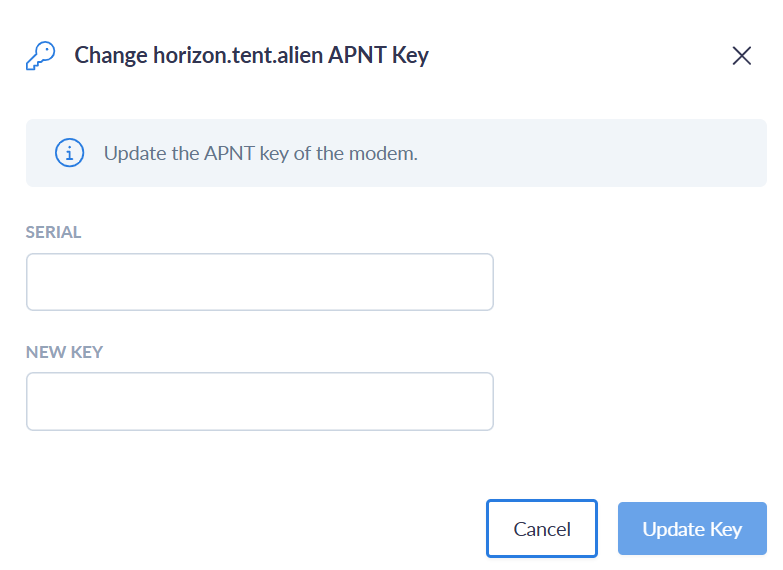
- For A-PNT enabled units, select Update APNT Key in the device management options.
- Enter the A-PNT module serial number, in the form
JL-04007. - When the update process is complete, trigger a remote reboot from Cloudloop Device Manager to load the key.
| Step 1 | Step 2 | Step 3 |
|---|---|---|
 |  |  |
Locally with the RockCONNECT IoT app
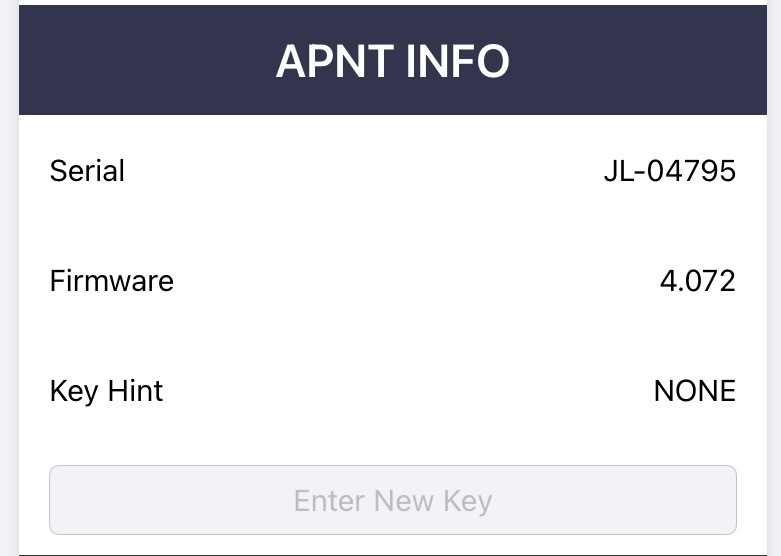
- Enter the new licence key on the config page of the RockCONNECT IoT app.
- Press Apply (top right of the screen) to deliver the key.
- Reboot the device to load the key.
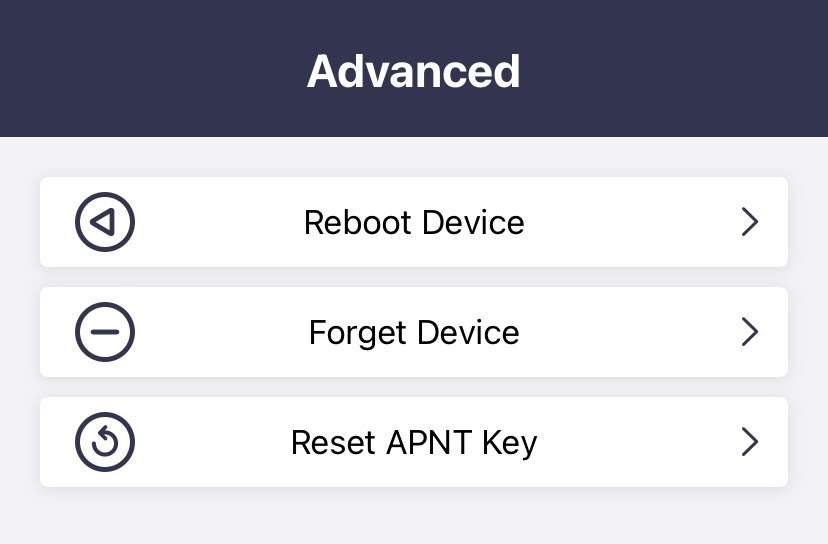
If the key is entered incorrectly or another error occurs, the A-PNT module can be reverted to a previously saved key by pressing Reset APNT Key in the Advanced menu.
With AT commands (NMEA 0183 version)
On the RockFLEET Assured NMEA 0183 version, the licence key can also be managed with AT commands over the serial interface:
AT+APNTWK=<KEY>: write a new licence key, e.g.AT+APNTWK=C5EXX2511RRR69W2ZMIT274V3111.AT+APNTGS: read the A-PNT module serial number.AT+APNTUK: restore the previous licence key.
AT+APNTUK will erase the current licence key and fall back to the previous one. If only one licence key is loaded, running this command may result in losing the only licence key.
Configuration
A-PNT settings are changed with the RockCONNECT IoT app over Bluetooth, or remotely with Cloudloop Device Manager. In the app, press Apply (top right of the screen) for changes to take effect. Changes made through Cloudloop Device Manager are sent over the satellite link and use data. On the NMEA 0183 version, settings can also be read and changed with AT commands over the serial interface.
RockFLEET Assured is supplied pre-configured. The recommended settings for the NMEA 2000 and NMEA 0183 versions are listed under Recommended settings by NMEA version.
Configuration names
Each setting below is shown with its configuration name, as used in Cloudloop Device Manager. The A-PNT module replaces the GNSS module, hence the A-PNT settings sit in the GNSS section and some elements are still referred to as 'GNSS'.
Enabled
Enabled
true- the A-PNT module is enabled, and its position data is made available to the application. Both A-PNT and GNSS positions are reported to Cloudloop at the set report interval.false- the A-PNT module is disabled.
NMEA forwarding
nmeaForwardEnabled
true- the selected NMEA sentences are streamed to the connected Chart Plotter or other equipment. Most sentences are streamed every second or when available; PJLTSVI is only streamed on receipt of an A-PNT burst.false- NMEA streaming is disabled.
All units are shipped with nmeaForwardEnabled set to false. This must be set to true using the mobile app or Cloudloop Device Manager for Chart Plotter communication to work.
Report interval
reportInterval
- unsigned integer - the number of seconds between position reports sent to Cloudloop. The interval applies to both the A-PNT and GNSS position reports, and is corrected to the nearest whole denomination of time, i.e. for 1 hour reports are made at the top of the hour.
0(zero) - disables Cloudloop position upload.
A-PNT mode
apntMode
DYNAMIC- use when the device to be tracked is a moving object. Applies the Kalman filter pre-set or custom settings to better track a moving object. Suitable for the vast majority of users.STATIC- use ONLY when the device to be tracked is predominantly stationary. The device assumes that it remains in a fixed position; Kalman filter pre-sets or custom settings are not applied. Over time, Static mode will arrive at the most accurate time and position.AUTO- uses the GNSS source to determine whether the receiver is moving, and switches automatically between static and dynamic mode. RequiresapntPowerSavingset toFAST, see A-PNT power saving. This mode is still undergoing further testing.
A-PNT Kalman filter
apntKalmanFilter
MARITIME- recommended for larger vessels.WALKING- tracking personnel on foot.DRIVING- vehicle based applications in relatively flat terrain.CUSTOM- use ONLY if you are manually setting up the Kalman filter with thecustomVtc,customHtc,customVssandcustomHssparameters, to better suit a particular application.
The pre-set values and the custom parameters are described under Custom Kalman Filter settings.
DYNAMIC must be selected in order to use the pre-set filter or create a custom filter.
A-PNT RF sensitivity
apntSensitivity
HIGH- maximum RF preamp gain. Gives the best results when indoors or in areas with a restricted view of the sky.MED- medium RF preamp gain.LOW- minimum RF preamp gain.
HIGH is not always the best setting to use. Where the signal strength is high, antenna gain is high and/or RF cable loss is low, it can lead to signal distortion and reduce the number of successfully processed position messages, resulting in a lower accuracy position. When a very high rate of Iridium STL® bursts is available, there can be advantages in lowering the sensitivity, as this helps to reject bursts with a degraded measurement quality and improves timing and positioning accuracy.
Similarly, LOW preamp gain coupled with RF losses in signal strength can have the same effect. This setting may need to be adjusted depending upon installation and geographical location.
NMEA sentence selection
nmeaSentences
Set each sentence to true to enable or false to disable it: GNGGA, GNRMC, GPGGA, GPRMC, GPZDA, PJLTPOS, PJLTSTAT, PJLTSVI, PJLTVEL and AISVDO. What each sentence contains is described under Position output. Sentences are output only when nmeaForwardEnabled is true.
A-PNT filter position
apntFilterPosition (available from firmware v0.19)
true- the position report uses the A-PNT position with the lowest EPE (Estimated Position Error) from the last 20% of the set report interval, i.e. if set to 10 minutes it selects the best from the last 2 minutes. The reported GNSS timestamp will match A-PNT.false- report without the filter applied.
A-PNT power saving
apntPowerSaving
FAST- turns power saving off. This gives the best performance, as all of the A-PNT module's power saving features are turned off.ECO- turns power saving on for all components (DUTY-CYCLE, RF-RECEIVER, SECOND-MCU, GNSS ...). Power saving will be between 300mW and 500mW.
One of the ECO power saving features turns OFF the GNSS receiver. For any application that uses GNSS (for example when apntMode is AUTO), apntPowerSaving must be set to FAST.
A-PNT hot
apntHot
false- when the reporting period is longer than 30 minutes, the A-PNT module remains unpowered until 20 minutes before a fix is due.true- the A-PNT module remains powered at all times.
A-PNT positioning source
apntPositionSource
GNSS- sets the PNT module to output GNSS positions.APNT- sets the PNT module to output A-PNT positions.
SVI reports
SVI (reserved for internal test use)
When necessary it is possible to obtain regular reports containing various additional sentences related to A-PNT.
Changing these settings could lead to a VERY high level of data consumption.
reportDuration- must be set to0to disable.reportTopic- internal test use.reportInterval- internal test use.
Custom Kalman Filter settings
| Parameter | Description | |
|---|---|---|
| VTC | Vertical Time Constant | Time constant over which the vertical velocity vector is likely to change (seconds) |
| HTC | Horizontal Time Constant | Time constant over which the horizontal velocity vector is likely to change (seconds) |
| VSS | Vertical Steady State | Standard deviation of vertical velocity vector (meters/second, 1-sigma) |
| HSS | Horizontal Steady State | Standard deviation of horizontal velocity vector (meters/second, 1-sigma) |
These parameters affect how the A-PNT module's internal Kalman filter estimates dynamic position in the absence of bursts or aiding inputs.
The time constant represents the PRESUMED rate at which the velocity vector is liable to change.
The steady state is the PRESUMED standard deviation of the velocity PDF (probability distribution function), in the axis or plane of interest.
A highly-dynamic, fast-moving object would necessitate a large steady state and a small time constant.
A slow-moving object that changes direction and speed only rarely would necessitate a small steady state and a large time constant.
For reference the Kalman Filter profiles are as follows:
| Pre-set | VTC [s] | HTC [s] | VSS [m/s] | HSS [m/s] |
|---|---|---|---|---|
| Maritime (Product produced before 28th Nov 2025) | 5 | 300 | 0.1 | 15 |
| Maritime (Product produced after 28th Nov 2025) | 5 | 60 | 0.1 | 15 |
| Walking | 5 | 300 | 0.1 | 5 |
| Driving (Product produced before 28th Nov 2025) | 30 | 10 | 0.1 | 10 |
| Driving (Product produced after 28th Nov 2025) | 5 | 30 | 0.5 | 10 |
Note: The pre-set values are factory set and can only be changed by loading a new kalman.cfg file (Contact tech support for details). Pre-set values are not impacted by firmware updates.
The table below shows alternative profiles for other tracking scenarios. Can be set using the 'custom' feature.
| Profile | VTC [s] | HTC [s] | VSS [m/s] | HSS [m/s] |
|---|---|---|---|---|
| Maritime slow moving | 5 | 60 | 0.1 | 15 |
| City driving | 5 | 30 | 0.5 | 10 |
| Highway driving | 5 | 300 | 0.5 | 15 |
| Fixed Wing Aircraft (small, slow) | 30 | 300 | 5 | 60 |
| Fixed Wing Aircraft (large, fast) | 30 | 300 | 10 | 100 |
| Rotary Aircraft | 30 | 300 | 5 | 60 |
| Walking speeds | 5 | 60 | 0.5 | 2 |
Chart Plotter and jamming/spoofing alarms
With NMEA forwarding enabled and the GPGGA, GPRMC and AISVDO sentences selected, a compatible Chart Plotter displays the A-PNT position as your own vessel and the GNSS position as a separate "GNSS POSITION" AIS vessel icon, so the two can be compared directly on the chart. From firmware v0.18 the device outputs the AIS (VDO) sentences used for this.
The RockFLEET Assured Full and Rapid Deploy bundles include the Raymarine AXIOM® 9 Chart Plotter: see Configuring the Raymarine AXIOM® 9 Chart Plotter. For how the circles and alarms appear on the Chart Plotter, see Position Display.
If errorCircle is enabled, the Chart Plotter draws a ring around the A-PNT vessel showing the real-time Estimated Position Error (EPE). If errorLimitCircle is enabled, a second ring shows the scaled EPE (epeScale × EPE) used as the spoofing alarm boundary; when epeScale is 1.0 both rings align.
The Chart settings configure the jamming and spoofing alarm trigger conditions as well as the displayed graphics. The boundary for spoof detection always scales with the A-PNT EPE, so that changes in the level of this error do not cause false alarms. Alarms cannot be suppressed directly; if false alarms occur or the alarm triggers too often, adjust the parameters below to tune the sensitivity to an appropriate level.
Chart
epeScale- multiplier that sets the boundary (second circle) for tripping the spoof detection alarm, set from0.5to10.0.positionCompareTimer- time the GNSS position needs to be outside the boundary (epeScale× EPE) before the spoof detection alarm is triggered, set from0to300seconds.utcDifferenceLimit- threshold before time spoof checking starts the timer, set from2to10seconds.utcDifferenceTimer- time the time difference threshold needs to be exceeded before alarming, set from0to300seconds.positionValidityTimer- time GNSS fixes are invalid or jammed before alarming, set from0to300seconds.errorCircle- settrueto display orfalseto hide the A-PNT Estimated Position Error (inner circle).errorLimitCircle- settrueto display orfalseto hide the outer circle.testingAllowed- settrueto allow the RockCONNECT IoT app to impose GNSS position changes for local test and demonstration purposes, orfalseto disable.
Position output
When nmeaForwardEnabled is true, the A-PNT module outputs position data in NMEA format. Select the sentences required with nmeaSentences.
| Sentence | Source | Content | Rate |
|---|---|---|---|
GPGGA | A-PNT | Global Positioning System Fix Data, in the GPS sentence format | Every second |
GPRMC | A-PNT | Recommended minimum specific GPS/Transit data, in the GPS sentence format | Every second |
GPZDA | A-PNT | Date and time | Every five seconds |
GNGGA, GNRMC | GNSS | GNSS positions provided by the GNSS decoder with the A-PNT module | |
PJLTPOS, PJLTSTAT, PJLTSVI, PJLTVEL | A-PNT | Proprietary A-PNT position and time data, see NMEA sentences | PJLTSVI on receipt of an A-PNT burst |
AISVDO | GNSS and alarms | AIS messages for the Chart Plotter: the GNSS position as an AIS vessel, labels, alarms and the EPE circle. Required for the EPE scale circle to be displayed. See RockFLEET Assured NMEA sentences |
GPGGA, GPRMC and GPZDA carry Iridium A-PNT data, not GNSS data, even though they use the GPS sentence format.
When PJLTSTAT is selected, the NMEA stream will also contain PJLTVEL.
For example:
$GPGGA,084908.00,5052.732865,N,00115.509451,W,1,04,8.0,-12.4,M,,*30
$GPRMC,084908.00,A,5052.732865,N,00115.509451,W,0.2,-69.8,270625,,*36
$GPZDA,084908.00,27,06,2025,+00,00*46
The NMEA 0183 and NMEA 2000 outputs of RockFLEET Assured, including the AIS messages and PGNs used by the Chart Plotter, are listed on RockFLEET Assured NMEA sentences. A-PNT and GNSS positions can also be monitored in the Cloudloop tracking platform. On the NMEA 0183 version, the current position can also be polled over the serial interface with AT+APNT or AT+GNSS.
GGA fields with A-PNT
Two GGA fields differ from those of a conventional GNSS receiver:
| Parameter | GNSS expected | A-PNT expected | Notes |
|---|---|---|---|
| GGA field 7 | Satellites in use, <30, higher is better | Satellites in use, <4, higher is better | Iridium STL® uses fewer satellites to enable positioning. |
| GGA field 8 | HDOP, 1 to 20, lower is better | PFOM, 1 to 9, lower is better | Horizontal Dilution of Precision is replaced with Position Figure of Merit. It is still a measure of estimated positional accuracy, but with a different range than HDOP. See the PFOM table below. |
PFOM table
| PFOM value | 1 | 2 | 3 | 4 | 5 | 6 | 7 | 8 | 9 |
|---|---|---|---|---|---|---|---|---|---|
| Estimated Position Error | <25m | <50m | <75m | <100m | <200m | <500m | <1000m | <5000m | ≥5000m |
NMEA sentences
The proprietary PJLT sentences below are enabled with the nmeaSentences setting.
$PJLTPOS,v,ssssssssss,f,ll.llllllll,yyy.yyyyyyyy,aaa.aa,xxxxxxxxx,yyyyyyyyy,zzzzzzzzz,uu.uuuu,uu.uuuu,uu.uuuu,uu.uuuu,uu.uuuu,uu.uuuu,b.b,s.s,p,g*[checksum]
- v is the message version
- ssssssssss is the current time with "format of time" below
- f is the format of time: 0 = GPS time, 1 = Unix time
- ll.llllllll is the latitude in signed decimal degree
- yyy.yyyyyyyy is the longitude in signed decimal degree
- aaa.aa is the antenna altitude above/below GPS height in meters when receiving STL® signals and MSL height when operating from the GNSS receiver
- xxxxxxxxx is the position in ECEF-X axis, in meter
- yyyyyyyyy is the position in ECEF-Y axis, in meter
- zzzzzzzzz is the position in ECEF-Z axis, in meter
- uu.uuuu are the uncertainty represented as local level covariance for EE, NN, UU, EN, EU, and NU, respectively
- b.b is the age of position in seconds since last burst
- s.s is the age of position in seconds since last sensor update
- p is the position figure of merit (PFOM) of current solution
- g is the current geo-location model configured 1 = STATIC
$PJLTSTAT,v,ssssssssss,b,s*[checksum]
- v is the message version
- ssssssssss is the GPS time (number of seconds since GPS epoch in 1980)
- b is the number of received bursts in last 60 seconds (bursts per minute, or BPM)
- s is the number of received strong (processed) bursts in last 60 seconds
$PJLTSVI,v,ssssss.ssssss,wwww,ii,cc.c,aaa.a,ee.e,xxxxxxxxx.x,yyyyyyyyy.y,zzzzzzzzz.z,xxxxxxxxx.x,yyyyyyyyy.y,zzzzzzzzz.z,ddddd.d,rrrrrrrrrrrrrrr.r,,,tttttt.ttttttttt,0xVV*hh
- v is the version of the reported PJLTSVI message
- ssssss.ssssss is the GPS TOW (TOT), the GPS Time of Week representing the time of transmission in seconds. Time is referenced to the middle of the burst waveform (a burst is 20.32 milliseconds long, so the middle occurs 10.16 milliseconds from the start). Note: Although GPS TOW is truncated to 1 us precision, all SVI data is derived from full precision TOT.
- wwww is the GPS week number (weeks) associated with GPS TOW (TOT)
- ii is the SV ID, the Satelles satellite identification number for the current satellite
- cc.c is the C/No, the carrier to noise density ratio of the current burst (dB-Hz). Typical values for processed bursts range from 40 dB-Hz to over 80 dB-Hz
- aaa.a is the azimuth (degrees) to the current satellite viewed from the receive antenna, based on the current best estimate of position [empty when internal position state unknown]
- ee.e is the elevation (degrees) to the current satellite viewed from the receive antenna, based on the current best estimate of position [empty when internal position state unknown]
- xxxxxxxxx.x is the current satellite's position in ECEF-x axis (meters) at the time of transmission
- yyyyyyyyy.y is the current satellite's position in ECEF-y axis (meters) at the time of transmission
- zzzzzzzzz.z is the current satellite's position in ECEF-z axis (meters) at the time of transmission
- xxxxxxxxx.x is the current satellite's velocity in ECEF-x axis (meters/second) at the time of transmission
- yyyyyyyyy.y is the current satellite's velocity in ECEF-y axis (meters/second) at the time of transmission
- zzzzzzzzz.z is the current satellite's velocity in ECEF-z axis (meters/second) at the time of transmission
- ddddd.d is the Doppler (Hz) for the current burst. Polarity corresponds to range rate (i.e. negative for approaching SV, positive for receding SV)
- rrrrrrrrrrrrrrr.r is the pseudorange (meters) for the current satellite, maximum value of 1 light-week ~1.8e14
- tttttt.ttttttttt is the GPS TOW (TOA), the GPS Time of Week representing the time of arrival in seconds. Time is referenced to the middle of the burst waveform (a burst is 20.32 milliseconds long, so the middle occurs 10.16 milliseconds from the start). Note: Time of arrival in GPS time is empty until internal position state is known.
- VV is the validity flags, a hexadecimal value representing multiple validity flags for data contained within the current message. Valid satellite pseudorange data VV |= 0x1; valid satellite position data VV |= 0x2
$PJLTVEL,v,iiiiiiiiii,e.eeeeee,n.nnnnnn,u.uuuuuu,ssssssssss*[checksum]
- v is the message version
- iiiiiiiiii is the serial number for the A-PNT receiver
- e.eeeeee is the velocity in east direction, in m/s
- n.nnnnnn is the velocity in north direction, in m/s
- u.uuuuuu is the velocity in up direction, in m/s
- ssssssssss is the GPS time (number of seconds since GPS epoch in 1980)